
Authentication
ApiKey header
Section titled “ApiKey header”Every request to https://apis.threelevers.com includes an ApiKey HTTP header. One production key can authorize multiple named service values (boundary layers, lookup datasets, proxy bridges)—each provisioned separately by Three Levers. The key does not imply a single layer; every call must also name which service you are using. There is no public layer catalog.
Do not paste production keys into:
- Flow formulas or Text templates on screen components
- Page layouts, Lightning pages, or Experience Cloud public assets
- Chatter, cases, or version-controlled metadata in plain text
Package-shipped credentials (Map Records install)
Section titled “Package-shipped credentials (Map Records install)”The Map Records and Take Action managed package includes:
| Metadata | Purpose |
|---|---|
Named Credential Three_Levers_API | Base URL https://apis.threelevers.com/ for callouts |
External Credential Three_Levers_API | Sends ApiKey via linked Named Principal |
Three Levers GIS Setting (APIKey__c) | Org-level key for hosted map availability and map token cache |
You do not need a separate Named Credential for standard GIS API + map usage. Post-install, update the Named Principal secret and custom setting—see Salesforce setup.
The same client key is stored in two places:
- External Credential → Named Principal → header APIKey (Flow and Apex callouts)
- Custom Settings → Three Levers GIS Setting → Organization → API Key (
APIKey__c) — enables hosted map mode and org-level map token cache refresh viaMapTokenService
Complete those key steps in Salesforce setup before granting Named Principal access below.
In subscriber orgs the callout prefix may appear as callout:three_levers__Three_Levers_API/...; the package Apex tries both prefixed and unprefixed names.
Permission set and Named Principal access
Section titled “Permission set and Named Principal access”After the APIKey is saved on the External Credential Named Principal, create a permission set and grant users access to that principal. Without this step, Flow callouts, Apex callouts, and map token requests can fail even when the key and custom setting are correct—Salesforce will not send the principal secret for users who are not assigned.
Flow and map callouts run as the running user (or the user viewing the Lightning page). Assign principal access to every user who runs GIS API Flows or opens pages with the hosted map.
Complete Salesforce setup Step 2 first—the APIKey must already be on the Named Principal.
Create a permission set
Section titled “Create a permission set”- Setup → Permission Sets → New.
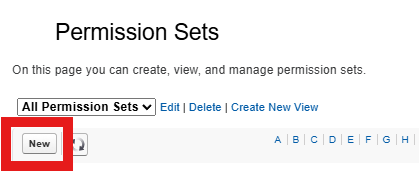
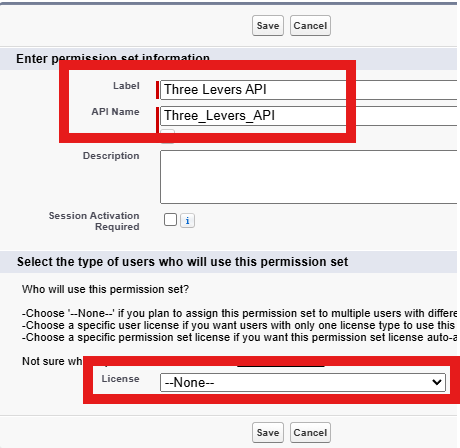
- Label: for example
Three Levers APIorGIS API Callout User. - License: —None— (so you can assign the set to users with different licenses).
- Save.
Enable External Credential Principal Access
Section titled “Enable External Credential Principal Access”- On the permission set, open Apps → External Credential Principal Access.

- Click Edit.
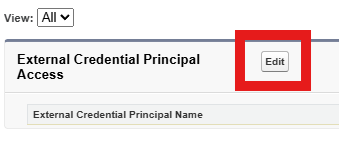
- Move Three Levers API - AUTH (or
Three_Levers_API - AUTH) to Enabled External Credential Principals → Save.

In managed-package orgs the enabled entry may show as Three_Levers_API - AUTH—that is the Named Principal on External Credential Three Levers API.
Assign users
Section titled “Assign users”- Click Manage Assignments → Add Assignments → select users who run GIS API Flows, configure the map, or use External Service callouts → Assign.
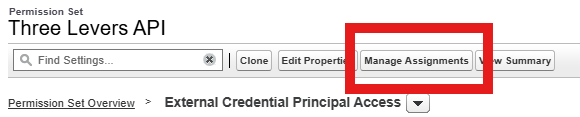
Combine GIS API access with any other permissions your org needs (Apex class access, report run, custom setting) in the same permission set or permission set group.
Order matters: Set the APIKey on the Named Principal first, then create and assign the permission set. If you assign users before the key is saved, they still cannot authenticate until the principal is configured.
Service scoping
Section titled “Service scoping”Your org receives one API key (stored on the Named Principal and custom setting). Three Levers attaches one or more named service values to that key—each service is a separate dataset or proxy endpoint (for example Acme_ServiceAreas_2026, Acme_Routes_2026, or CensusGeocoder).
- Pass the correct
serviceparameter on every lookup, extract, proxy, map-token, or hosted-map request. - The same APIKey works for all services provisioned on your key; you do not need a separate key per layer.
- Requesting a
servicethat was never provisioned for your key, or misspelling the name, returns an error—confirm your full list with Three Levers.
When you add a new layer later, Three Levers registers another service name on your existing key. Import a new External Service in Salesforce for that name (OpenAPI import); you do not rotate the API key unless Three Levers issues a replacement.
Token vs data endpoints
Section titled “Token vs data endpoints”| Call type | Auth | Notes |
|---|---|---|
| Lookup / extract / proxy | ApiKey on Named Credential | No separate map token |
Map token (POST /gis/v1/token/) | ApiKey via External Credential | Short-lived token cached in custom setting; see Hosted map |
Sandbox keys
Section titled “Sandbox keys”Production API keys only today. Sandbox keys are not offered.
Related
Section titled “Related”- Salesforce setup — step-by-step principal + custom setting
- Troubleshooting — 401 and HTML responses