
Hosted map
Use this page when the Map Records and Take Action component loads the hosted v1 map (iframe overlay, click-to-select, draw fence with boundary layer)—not for Flow-only lookup callouts.
GIS API map token and extract endpoints require the same API key configuration as data callouts. See Salesforce setup for the dual key path.
Requirements
Section titled “Requirements”| Requirement | Notes |
|---|---|
| Package installed | reportMapWithFence + MapTokenService |
| API Key on custom setting | Non-blank APIKey__c → hosted mode available |
| Named Principal APIKey | Same key; used for POST /gis/v1/token/ |
Licensed service | One of the names on your API key—not demo names unless licensed |
| CSP Trusted URL | https://apis.threelevers.com with frame-src |
App Builder — Map Overlay fields
Section titled “App Builder — Map Overlay fields”In Lightning App Builder, the component exposes Overlay Service and Map URL fields (in addition to Configuration JSON):
- Overlay Service — your licensed
servicename (must be provisioned on your API key) - Map URL —
https://apis.threelevers.com/gis/map/v1/
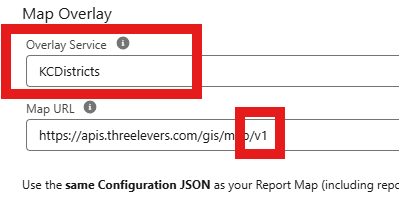
These correspond to the service and serviceUrl keys in Configuration JSON below.
Configuration JSON (App Builder)
Section titled “Configuration JSON (App Builder)”Set on the Map Records and Take Action component:
{ "reportId": "00OXXXXXXXXXXXX", "latitudeColumn": "YOUR_LAT_COLUMN", "longitudeColumn": "YOUR_LNG_COLUMN", "idColumn": "YOUR_ID_COLUMN", "service": "YourLicensedServiceName", "serviceUrl": "https://apis.threelevers.com/gis/map/v1/", "flowApiName": "Your_Flow_API_Name", "nearDistanceMiles": 5}service— must match oneserviceprovisioned on your API key (each Lightning page picks one layer; your key may include several).serviceUrl— use HTTPS v1 map base; component may upgrade HTTP for Three Levers hosts.
See also Map Records configuration for the full component JSON reference.
Token cache and refresh
Section titled “Token cache and refresh”MapTokenService:
- Reads API Key from custom setting to decide if external map is offered.
- Requests a short-lived token via Named Credential callout to
/gis/v1/token/. - Caches token on custom setting fields
Map_Token__candToken_Expires_At__c.
After rotating the API key, update both key locations and click Refresh on the component (or call MapTokenService.clearTokenCache()).
CSP Trusted URL
Section titled “CSP Trusted URL”- Setup → Trusted URLs (or CSP Trusted Sites).
- New → URL
https://apis.threelevers.com - Enable frame-src (iframe). Add connect-src / img-src if your org policy blocks child resources.
Local-only mode: If API Key is blank, the component falls back to local Leaflet (draw fence without overlay). No GIS API token is used.
Send to Flow
Section titled “Send to Flow”Hosted map + Send to Flow uses Screen Flow Text inputs such as inIds, outIds, nearIds (comma-separated record IDs). See Map Records Flow integration.