
Salesforce setup
Configure GIS API access after installing Map Records and Take Action (managed package, namespace three_levers). The package already includes Named Credential, External Credential, and custom settings—you add your client-assigned API key in two places so Flow callouts and the hosted map both work.
For first-time package install (third-party access approval, sample report, App Builder, and Send to Flow), follow the Map Records Quick Start—then return here for API key and External Service setup.
Prerequisites
Section titled “Prerequisites”- Map Records and Take Action installed (see below).
- API key and service name(s) from Three Levers onboarding—one key may cover multiple
servicevalues (not from a public catalog). - Admin access: Customize Application, manage credentials and custom settings.
Install the managed package
Section titled “Install the managed package”GIS API credentials ship in the same Three Levers Core package as the map component. Install using the link for your org type:
| Org | Install link |
|---|---|
| Production | Loading install links… |
| Sandbox | Loading install links… |
On the install screen, select Install for All Users, acknowledge the non-Salesforce application checkbox, and approve third-party access when prompted. For screenshots and the full walkthrough (sample report, Flow template, App Builder JSON), see Map Records Quick Start.
Step 1 — Three Levers GIS Setting (custom setting)
Section titled “Step 1 — Three Levers GIS Setting (custom setting)”The org-level API Key field controls whether the map component offers hosted map / overlay mode and supplies MapTokenService.isExternalMapAvailable().
- Setup → search Custom Settings → open Custom Settings.
- In the list, find Three Levers GIS Setting and click Manage.
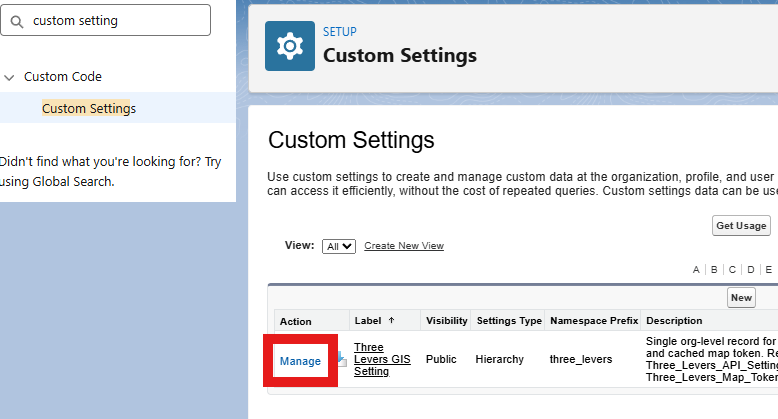
- Click Organization (org-level default).
- Set API Key to your Three Levers–issued key (same value you will use in Step 2).
- Optional: Map Center Latitude / Map Center Longitude for default map center.
- Save.

Important: This field does not automatically populate the External Credential. Credential headers cannot reference custom settings—you must set the principal in Step 2 as well.
Step 2 — External Credential Named Principal (ApiKey for callouts)
Section titled “Step 2 — External Credential Named Principal (ApiKey for callouts)”Token and lookup callouts use callout:Three_Levers_API/... (or callout:three_levers__Three_Levers_API/... in managed installs). The ApiKey header value comes from the External Credential Named Principal.
- Setup → Named Credentials.
- On the Three Levers API row, click Three Levers API under External Credential to open the External Credential record.
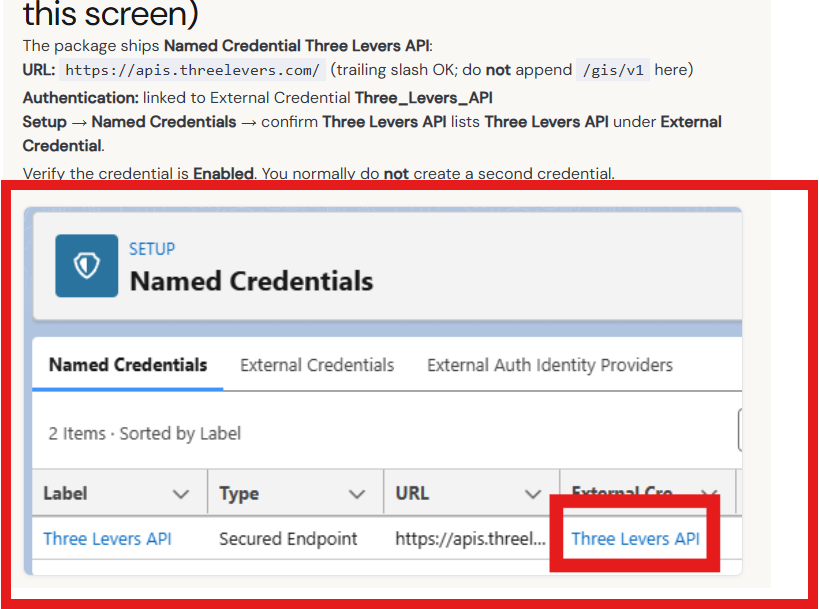
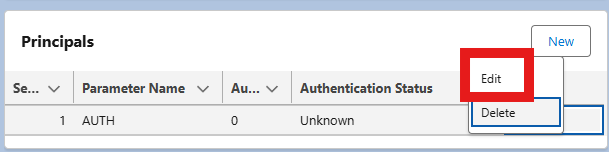
- Open the Principals related list. On the AUTH row, open the action menu → Edit.
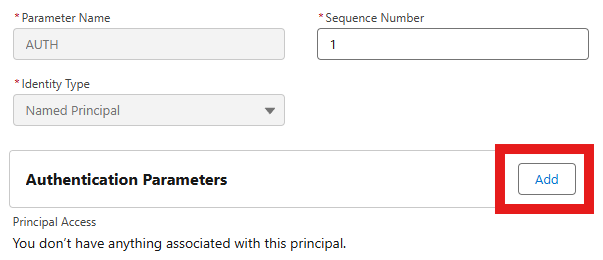
- Under Authentication Parameters, click Add.
- Set Name to
APIKeyand Value to your client-assigned key (same key as Step 1) → Save.

Then grant Named Principal access via permission set—see Authentication. Do this after the APIKey is saved on the principal.
Step 3 — Confirm Named Credential (no key on this screen)
Section titled “Step 3 — Confirm Named Credential (no key on this screen)”The package ships Named Credential Three Levers API:
- URL:
https://apis.threelevers.com/(trailing slash OK; do not append/gis/v1here) - Authentication: linked to External Credential Three_Levers_API
On Setup → Named Credentials, confirm Three Levers API shows the correct URL and External Credential link (as in Step 2). Verify the Named Credential is Enabled. You normally do not create a second credential.
Step 4 — Rotate or replace an API key
Section titled “Step 4 — Rotate or replace an API key”When Three Levers issues a new key, update both:
- Three Levers GIS Setting → API Key
- External Credential → Named Principal → APIKey
Then clear the cached map token:
- On the Map Records and Take Action component, click Refresh, or
- Run Apex that calls
MapTokenService.clearTokenCache()(clearsMap_Token__c/Token_Expires_At__con the custom setting).
Flow and External Service callouts pick up the new principal value on the next callout; no External Service re-import is required for a key-only rotation.
Step 5 — External Service (per service on your key)
Section titled “Step 5 — External Service (per service on your key)”Your API key can authorize multiple service names. For each provisioned service, import OpenAPI once (same Three_Levers_API Named Credential for every import):
- Setup → External Services → New External Service.
- Choose From API Specification.
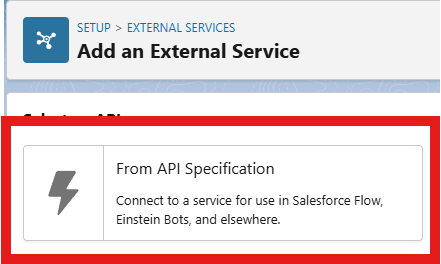
- On Provide Registration Details:
- External Service Name: a label for this layer (for example
KCDistricts—use your licensed name, not demo names unless licensed). - Service Schema: Absolute URL
- Select a Named Credential: Three Levers API (
three_levers__Three_Levers_APIin managed orgs) - URL:
https://apis.threelevers.com/gis/v1/swagger.php?service=YourServiceName(replaceYourServiceNamewith your licensed name)
- External Service Name: a label for this layer (for example
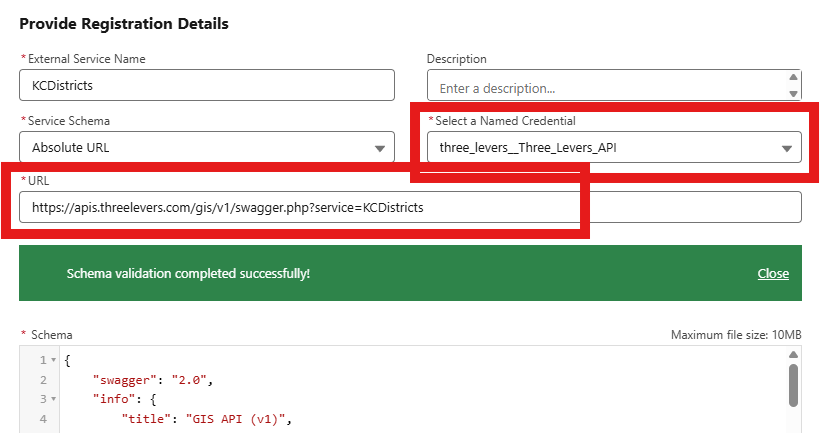
- Wait for Schema validation completed successfully, then continue.
- On Select Operations, enable
getLookup(andpostLookuponly if you need it).
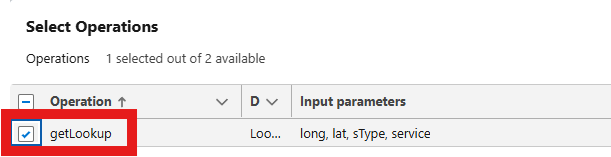
- Save and note the generated Flow action name (for example
KCDistricts.getLookup).
Proxy services use a separate URL, for example:
https://apis.threelevers.com/gis/v1/proxy/swagger.php?service=CensusGeocoderRepeat steps 1–6 for each additional service on your API key. See also OpenAPI import.
Step 6 — Flow callout (smoke test)
Section titled “Step 6 — Flow callout (smoke test)”- Create or open a Record-Triggered or Screen Flow.
- Add an element → Action.
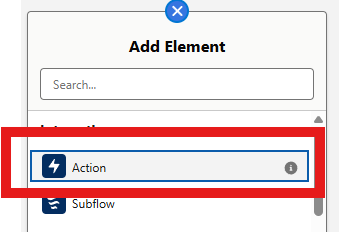
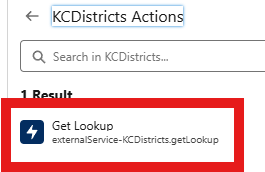
- Under Action, choose External Services → your imported service (for example KCDistricts).

- Select Get Lookup (
externalService-YourServiceName.getLookup).
- Set Input Values:
- lat / long — from record fields or prior steps
- service — your licensed name (must match the Swagger import; example shows
KCDistricts) - sType —
inornearas needed

- Map outputs to Flow variables. Run Debug and confirm responseCode
200with populated properties (field names vary by layer).
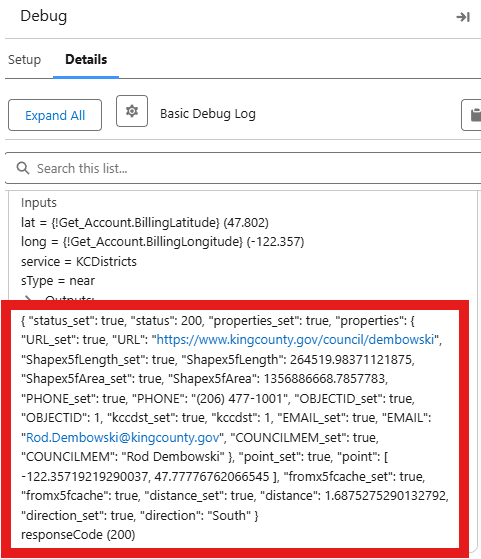
Success data may appear directly on the action output or under Code200 depending on your imported schema—map the path your Flow debug shows.
Step 7 — Hosted map (optional)
Section titled “Step 7 — Hosted map (optional)”If you use the Map Records and Take Action component with hosted overlay / iframe mode, complete the base map setup before adding your GIS service.
First, follow the Map Records Quick Start to install the package, add the component to a Lightning page, and fully configure the map—report, location columns, Flow, and Configuration JSON—so the page works in free (draw fence) mode. Only after that works, return here to add Overlay Service and Map URL for your licensed boundary layer (requires Steps 1–2 API key configuration above).
- Open the Lightning page in App Builder → select the Map Records and Take Action component.
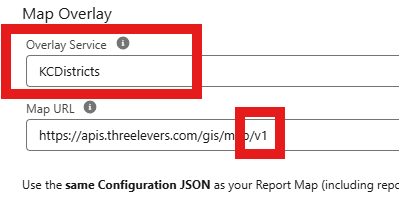
- Under Map Overlay (or equivalent overlay section):
- Overlay Service — your licensed
servicename (example:KCDistricts; use your provisioned name) - Map URL —
https://apis.threelevers.com/gis/map/v1/(HTTPS v1 base)
- Overlay Service — your licensed
- Add CSP Trusted URL for
https://apis.threelevers.comif not already done—see Hosted map.
Common pitfalls
Section titled “Common pitfalls”| Issue | What to check |
|---|---|
| 401 Unauthorized | Named Principal APIKey matches issued key; key active for your service; user has Named Principal permission set assignment |
| Hosted map hidden | APIKey__c blank on custom setting—even if principal is set |
Duplicate /gis/v1/gis/v1/ | Named Credential URL is host only; paths come from External Service |
| HTML instead of JSON | Wrong URL, missing ApiKey, or callout not using Named Credential |
| Token errors after key change | Update both key locations; click Refresh on map component |
Validation checklist
Section titled “Validation checklist”- Custom setting API Key set (org default)
- External Credential Named Principal APIKey matches custom setting
- Permission set assigns Named Principal access on Three Levers API to map and Flow users
- Named Credential Three_Levers_API enabled, URL
https://apis.threelevers.com/ - At least one External Service imported per
serviceyou use (multiple imports if you have multiple layers on the same key) - Flow debug shows responseCode 200 and populated properties for a known inside point
- (If using map) CSP Trusted URL and
service/serviceUrlin component JSON
Related
Section titled “Related”- Map Records Quick Start — package install, App Builder, and first map
- Authentication
- OpenAPI import
- Lookup
- Hosted map
- Troubleshooting
Need help? Contact support.